Excellent news: wxWidgets has been accepted to participate in Google Summer of Code 2009 again! Congratulations to the other 149 accepted organizations but I'm especially glad about this one :-) I admit that I was rather worried about it as we already were lucky enough to be part of GSoC during the last 3 years and it was mentioned that some previously selected organizations couldn't be accepted this year to make place for new ones. But all is well that ends well.
Now we need to attract enough good students applications before the April 3 deadline to be able to choose the best ones of them. And while we also have a list of proposed projects we also are always looking for more so please update the Wiki page or post to our mailing lists if you think you have an interesting idea.
So if you are a wxWidgets user or a user of any wxWidgets application please tell any students around you about the possibility to work on wxWidgets during this summer. And, of course, if you are a student yourself, consider applying!
Thursday, March 19, 2009

Monday, March 09, 2009
wx Sightings in the Wild
I've just discovered (please don't laugh as apparently everyone else made this discovery a year or at least half a year ago but better late than never) a nice solution for synchronizing files between different machines called Dropbox. For those of you who are as ignorant as me, it's basically a way to transparently rsync files (up to 2GB for free) with Amazon S3 storage. The transparent part is nice as it means that you just run a daemon monitoring the dropbox directory in an efficient way (using inotify under Linux and, my guess would be, using ReadDirectoryChangesW() under Windows) and don't have to manually commit and update your files as I was doing so far, using a central CVS server (from which I'm slowly moving to an hg one). And, unlike CVS, Dropbox also provides a nice way to access your files from any JavaScript-enabled browser (which is more convenient than hg web interface but then it's not at all meant to do the same thing).

The only problem with Dropbox is that the daemon part of their product is not open source. This is really a pity but it also explains why I started looking at its internals at all -- only to discover that it is written using wx, more precisely wxPython. It's not the most demanding GUI application in existence but it's still nice to see that an application used by many (how many? I don't know but judging from amount of stuff written about it on the web this must be one of the most widely used wx applications in existence) people is written in wx and apparently nobody complains about its GUI.
So while I'll probably mostly continue to use hg myself, I'll certainly recommend it to my less DVCS-inclined friends and relatives. And if any of the readers of this blog want to try it out, don't hesitate to use my affiliate link to register and get extra 250MB of space for both you and me.

The only problem with Dropbox is that the daemon part of their product is not open source. This is really a pity but it also explains why I started looking at its internals at all -- only to discover that it is written using wx, more precisely wxPython. It's not the most demanding GUI application in existence but it's still nice to see that an application used by many (how many? I don't know but judging from amount of stuff written about it on the web this must be one of the most widely used wx applications in existence) people is written in wx and apparently nobody complains about its GUI.
So while I'll probably mostly continue to use hg myself, I'll certainly recommend it to my less DVCS-inclined friends and relatives. And if any of the readers of this blog want to try it out, don't hesitate to use my affiliate link to register and get extra 250MB of space for both you and me.
Saturday, February 28, 2009
February 2009 News
Maybe it's because February is so short or, more likely, because we started a lot of things in January, but not that many exciting things have happened in wx land during this month. To continue from the last month summary, we did move closer to finalizing the new event handling code, although we had to introduce a new Bind() method (which I'm going to describe in another post soon) as trying to introduce new features while keeping backwards compatibility with the existing code using Connect() proved to be too hard. And the wxYield-related changes were mostly finished too.
Unfortunately not much has been done for the remaining big item for 2.9.0 release: unification of the debug and release builds. This is something which would be really useful for both the library users and developers and actually doing it will probably be not that difficult -- but deciding what exactly should be done proves to be more agonizing than expected. I still hope to do it in March but then I said the same thing about February at the end of January, of course...
There were also some discussions about releases: both 2.8.10 and 2.9.0. Please help us with testing them if you can!
The only new features of note implemented in this month were, AFAICS, the new wxTaskBarIcon implementation for wxGTK by Paul which should look much better in modern desktop environments and support for hints (a.k.a. cue banners or placeholder strings) to wxTextEntry (and hence wxTextCtrl and wxComboBox).
As usual, several bugs were fixed. The most important one was arguably #626 which is a problem with wxTreeCtrl selection events in wxTR_MULTIPLE mode. As can be seen from its number, it was a very long-standing ticket and while the fix hasn't been checked in just yet, it's going to be done very soon -- thanks a lot to Jonathan Liu who spent a lot of time working on this (and several other bugs as well).
Finally, some statistics for February: there were 632 commits in the repository, 67 new tickets were created, 84 were modified and 61 were closed. We'll try to do better in the next month (and preferably not by making Trac crash with internal server error and thus making it impossible for people to enter new tickets... I do love Trac UI and workflow but it's still amazing that it's the only ticketing system which I ever saw crashing -- but then I saw it do this all the time).
That's all for this month folks and have a nice March!
Unfortunately not much has been done for the remaining big item for 2.9.0 release: unification of the debug and release builds. This is something which would be really useful for both the library users and developers and actually doing it will probably be not that difficult -- but deciding what exactly should be done proves to be more agonizing than expected. I still hope to do it in March but then I said the same thing about February at the end of January, of course...
There were also some discussions about releases: both 2.8.10 and 2.9.0. Please help us with testing them if you can!
The only new features of note implemented in this month were, AFAICS, the new wxTaskBarIcon implementation for wxGTK by Paul which should look much better in modern desktop environments and support for hints (a.k.a. cue banners or placeholder strings) to wxTextEntry (and hence wxTextCtrl and wxComboBox).
As usual, several bugs were fixed. The most important one was arguably #626 which is a problem with wxTreeCtrl selection events in wxTR_MULTIPLE mode. As can be seen from its number, it was a very long-standing ticket and while the fix hasn't been checked in just yet, it's going to be done very soon -- thanks a lot to Jonathan Liu who spent a lot of time working on this (and several other bugs as well).
Finally, some statistics for February: there were 632 commits in the repository, 67 new tickets were created, 84 were modified and 61 were closed. We'll try to do better in the next month (and preferably not by making Trac crash with internal server error and thus making it impossible for people to enter new tickets... I do love Trac UI and workflow but it's still amazing that it's the only ticketing system which I ever saw crashing -- but then I saw it do this all the time).
That's all for this month folks and have a nice March!
Saturday, January 31, 2009
January 2009 Progress Report
As the post about wx progress in 2008 seemed to generate quite some interest, here is the promised update for the things we did in the first month of 2009.
The main new addition was probably the long-discussed support for persistent controls. This is not completely done yet but initial implementation of the basic support for persistence was checked in and now persistent adapters for more wxWidgets classes (currently only wxTopLevelWindow and wxBookCtrls are covered) can be added one by one.
Another important change was the integration of the type-safe events patch from Peter Most. Not only it makes the events safer but it also allows connecting anything as an event handler, not necessarily a method of wxEvtHandler-derived class. Unfortunately we hit some problems with building this code with all but the very latest compilers (we didn't even try to use it with VC6, but it was a bad surprise that VC7 template deduction was not smart enough for it neither) so currently it is still disabled but we plan to re-enable it a.s.a.p.
Speaking of the improvements to compile-time safety, Francesco has modified wxWindow::ProcessEvent to be protected at wxWindow level as it should never be called directly but only as win->GetEventHandler()->ProcessEvent() or, with the latest trunk, as win->ProcessWindowEvent() which does the same thing, to avoid skipping any event handlers pushed onto the window. Doing this allowed to find several places in wxWidgets itself where GetEventHandler() call was forgotten and there are certainly a lot of similar omissions in code outside of wx itself which this change will now allow to find during compile-time.
There was also more work done on the native headers (with nice support of sorting and column reordering) in wxDataViewCtrl and wxGrid (special thanks to Zen Fire for sponsoring this work!) and on wxDataViewCtrl in general. In particular the simple wxDataViewListCtrl wrapper was added and event-based API for drag-and-drop was implemented.
The last problems with support for custom controls in native file dialogs under Windows were solved thanks to Marcin so now only Mac support for this feature is missing. Speaking of Mac, the new OS X port kept progressing in leaps and bounds and I'm especially glad that several people have contributed to it recently -- thanks!
Then there were some improvements to MDI stuff. This code was not updated for a long time so I started reviewing and correcting it in last November and continued to do so, while adding some new features, now.
And finally some useless statistics: so far (the month is not quite over yet...) there were 850 check ins in January. 138 new tickets were created, 211 ones were closed (at least we're moving in the right direction!) and Trac records 365 ticket modifications in total from 93 different people (with Robin and me doing most of the damage with about 70 changes each).
On a completely unrelated note, I've installed, out of curiosity, beta of Windows 7 and tested some wx samples under it. They have no special support of Windows 7 (nor even Vista yet) but they still appear to be quite fine, only small details (e.g. owner drawn menu items) look out of place. I'm not sure if this can really be seen as our merit though, it's probably more a compliment to Microsoft for maintaining backwards compatibility. Although it also clearly shows the advantage of using native controls -- I doubt that the programs written using Qt, especially using its version from a few years ago, look as good as the ones written even very old wx versions under the new system. Other than that, my main impression of Windows 7 is that it's amazing that it still needs to restart when changing the workgroup name. I guess they didn't want to remove all old and familiar features at once...
And to end this post, some less technical news: we made a brief roadmap for 3.0 release. This is not much in itself but it does help to concentrate thoughts on it and hopefully gives a bit more visibility into the project future for people not reading this blog.
And I was extremely glad to learn that wxWidgets now has a new maintainer in Debian as I almost lost hope to ever see them there as the old maintainer spent his time only sabotaging the efforts by others to bring wx to Debian and spreading FUD about it in his spare time whereas the new maintainer has already released the updated packages which is great news for me both from a wx developer and a Debian user viewpoint. We also had a discussion with Dan Horák, Fedora packager of wxGTK, about supporting multiarch (mostly x86/amd64) packages and making RPMs for wxWidgets 3.0 (interested people can already try these experimental pre-2.9 versions).
The main new addition was probably the long-discussed support for persistent controls. This is not completely done yet but initial implementation of the basic support for persistence was checked in and now persistent adapters for more wxWidgets classes (currently only wxTopLevelWindow and wxBookCtrls are covered) can be added one by one.
Another important change was the integration of the type-safe events patch from Peter Most. Not only it makes the events safer but it also allows connecting anything as an event handler, not necessarily a method of wxEvtHandler-derived class. Unfortunately we hit some problems with building this code with all but the very latest compilers (we didn't even try to use it with VC6, but it was a bad surprise that VC7 template deduction was not smart enough for it neither) so currently it is still disabled but we plan to re-enable it a.s.a.p.
Speaking of the improvements to compile-time safety, Francesco has modified wxWindow::ProcessEvent to be protected at wxWindow level as it should never be called directly but only as win->GetEventHandler()->ProcessEvent() or, with the latest trunk, as win->ProcessWindowEvent() which does the same thing, to avoid skipping any event handlers pushed onto the window. Doing this allowed to find several places in wxWidgets itself where GetEventHandler() call was forgotten and there are certainly a lot of similar omissions in code outside of wx itself which this change will now allow to find during compile-time.
There was also more work done on the native headers (with nice support of sorting and column reordering) in wxDataViewCtrl and wxGrid (special thanks to Zen Fire for sponsoring this work!) and on wxDataViewCtrl in general. In particular the simple wxDataViewListCtrl wrapper was added and event-based API for drag-and-drop was implemented.
The last problems with support for custom controls in native file dialogs under Windows were solved thanks to Marcin so now only Mac support for this feature is missing. Speaking of Mac, the new OS X port kept progressing in leaps and bounds and I'm especially glad that several people have contributed to it recently -- thanks!
Then there were some improvements to MDI stuff. This code was not updated for a long time so I started reviewing and correcting it in last November and continued to do so, while adding some new features, now.
And finally some useless statistics: so far (the month is not quite over yet...) there were 850 check ins in January. 138 new tickets were created, 211 ones were closed (at least we're moving in the right direction!) and Trac records 365 ticket modifications in total from 93 different people (with Robin and me doing most of the damage with about 70 changes each).
On a completely unrelated note, I've installed, out of curiosity, beta of Windows 7 and tested some wx samples under it. They have no special support of Windows 7 (nor even Vista yet) but they still appear to be quite fine, only small details (e.g. owner drawn menu items) look out of place. I'm not sure if this can really be seen as our merit though, it's probably more a compliment to Microsoft for maintaining backwards compatibility. Although it also clearly shows the advantage of using native controls -- I doubt that the programs written using Qt, especially using its version from a few years ago, look as good as the ones written even very old wx versions under the new system. Other than that, my main impression of Windows 7 is that it's amazing that it still needs to restart when changing the workgroup name. I guess they didn't want to remove all old and familiar features at once...
And to end this post, some less technical news: we made a brief roadmap for 3.0 release. This is not much in itself but it does help to concentrate thoughts on it and hopefully gives a bit more visibility into the project future for people not reading this blog.
And I was extremely glad to learn that wxWidgets now has a new maintainer in Debian as I almost lost hope to ever see them there as the old maintainer spent his time only sabotaging the efforts by others to bring wx to Debian and spreading FUD about it in his spare time whereas the new maintainer has already released the updated packages which is great news for me both from a wx developer and a Debian user viewpoint. We also had a discussion with Dan Horák, Fedora packager of wxGTK, about supporting multiarch (mostly x86/amd64) packages and making RPMs for wxWidgets 3.0 (interested people can already try these experimental pre-2.9 versions).
Wednesday, January 14, 2009
Qt switch to LGPL
Qt switch to LGPL has triggered a thread with subject "Bad thing for wxWidgets Qt will be in LGPL" on wx-users mailing list which clearly implies that this is indeed a bad thing. But is it one really?
First, let's not be egoistic: even if this were bad for wx, it's surely excellent news for just about everybody [else]. I do applaud Nokia for doing the right thing and I'm personally very glad that even people in big multinational companies such as Nokia understand the benefits of open source.
Second, this certainly will bring more users to Qt. But I'm not sure it's going to happen at the expense of wxWidgets users. I rather think more people thinking to use Java or C# or C (with GTK) could reconsider their choice and use C++ with Qt. The reason for this cautious optimism is that the cost of Qt has never been the only reason for choosing wxWidgets over it. Of course, this hasn't ever been important for GPL applications anyhow. And, surprisingly, it often wasn't very important for commercial applications neither as companies often choose to pay for wxWidgets support anyhow even if the library itself is free. So I think that relatively few of people who had chosen wxWidgets in the past would change their mind now, as the other two main reasons for this choice -- the use of native widgets by wxWidgets and the absence of any preprocessor -- remain as valid as ever.
Finally, if more people use C++ for developing cross-platform applications this is good for wxWidgets even if they use Qt because the whole idea of writing portable programs is unfortunately still not as entrenched in mass conscience as it should be in our opinion. So this could yet turn out to be positive for wxWidgets, although more likely it's not going to change much for us one way or the other.
But this remains great news for the open source community (of which we are part) so I just can't bring myself to regret it. I can dream about wxTNG which would combine the best features of wx and Qt but this still remains a dream for now...
First, let's not be egoistic: even if this were bad for wx, it's surely excellent news for just about everybody [else]. I do applaud Nokia for doing the right thing and I'm personally very glad that even people in big multinational companies such as Nokia understand the benefits of open source.
Second, this certainly will bring more users to Qt. But I'm not sure it's going to happen at the expense of wxWidgets users. I rather think more people thinking to use Java or C# or C (with GTK) could reconsider their choice and use C++ with Qt. The reason for this cautious optimism is that the cost of Qt has never been the only reason for choosing wxWidgets over it. Of course, this hasn't ever been important for GPL applications anyhow. And, surprisingly, it often wasn't very important for commercial applications neither as companies often choose to pay for wxWidgets support anyhow even if the library itself is free. So I think that relatively few of people who had chosen wxWidgets in the past would change their mind now, as the other two main reasons for this choice -- the use of native widgets by wxWidgets and the absence of any preprocessor -- remain as valid as ever.
Finally, if more people use C++ for developing cross-platform applications this is good for wxWidgets even if they use Qt because the whole idea of writing portable programs is unfortunately still not as entrenched in mass conscience as it should be in our opinion. So this could yet turn out to be positive for wxWidgets, although more likely it's not going to change much for us one way or the other.
But this remains great news for the open source community (of which we are part) so I just can't bring myself to regret it. I can dream about wxTNG which would combine the best features of wx and Qt but this still remains a dream for now...
Tuesday, January 06, 2009
Another Year of WX
I wanted to write this summary of the work done on wx in 2008 before the end of the year but, as it unfortunately often happens, ran out of time and couldn't do it. Still, better late than never -- again this is a very familiar principle -- and so here is a brief summary of important things which happened to wx in 2008. It liberally reuses the material from Robert's Wonderful World of WX write up, read it for more details.
So, what have we done in the almost 7000 revisions checked in during 2008? Maybe surprisingly, the most important changes haven't been about writing code at all but rather about improving the project infrastructure. This may not seem like a big deal but the old SourceForge-based bug tracker was completely unusable and basically was unused because of this and literally hundreds of bugs could have been triaged and closed since the switch to using Trac. We also finally have a working BuildBot which allows to detect breaking the build (and assigning the blame) quickly and automatically and this is very useful for a project such as wx where it's not always possible to test the compilation of the new code in all configurations under all platforms. Finally, the documentation now is in a new Doxygen-based format which makes it easier to maintain and contribute to it, as well as producing nicer results.
By the way, you might have noticed that one of the goals of these changes was to make it easier to contribute to wxWidgets:
But while waiting for the success of our diabolic plans to make wxWidgets users work on improving the library themselves we still found time to do quite a few things ourselves. From the strategical perspective the most important change of 2008 was certainly the decision to start merging the old Carbon-based wxMac port and the alpha-quality wxCocoa into the new, one and only, wxOSX port which will run on both 32 and 64 bit platforms and also iPods and iPhones and not just the boring desktops. And as a side note, wxOSX can now also be built as a framework and not just as plain old Unix-style dynamic library.
Another strategic decision was to concentrate more on the quality of the library than on the quantity of the things it may do. This has led to dropping of ODBC library which was embarrassingly buggy and unmaintained since a very long time and spending a lot of effort on bug fixing, including the inconsistencies in behaviour between different ports (and while this post intentionally doesn't cite any names to avoid accidentally omitting somebody, I do have to thank once again Google for organizing, once again, the Summer of Code which allowed us to spend more resources than would have otherwise been possible on this task -- let's give credit where it is due). In the same category, we have finally cleaned up wxSocket and wxURL code which became an acute embarrassment to all of us after a decade of bit-rotting and also fixed some, although by far not all, problems with wxGrid which also suffered from chronic lack of attention.
Of course, all this doesn't mean that there were no new features added so let me list the most important ones:
And I probably forget quite a few more.
But while things have progressed quite a lot, we didn't manage to do everything we'd have liked to, of course (otherwise what would be doing this year?). My main regret is that we didn't manage to release 2.9.0 development branch preview release as I'd really like to do this a.s.a.p. to get more feedback about the Unicode-related changes. Among the features we hoped to add this year but didn't one really stands out: a lot of people are asking for images support in wxButton and we really should support this as it's not even difficult to do so this will definitely be something to do in 2009.
The two other small things we hope to see in this new year are the wxOSX completion and hopefully the 3.0 release. Let's see if this happens...
That's all for 2008 and see you in a year time (unless people find this post really interesting, in which case I might try to write monthly summaries of wx development)!
P.S. Edited to correct the date on 2009-01-09.
So, what have we done in the almost 7000 revisions checked in during 2008? Maybe surprisingly, the most important changes haven't been about writing code at all but rather about improving the project infrastructure. This may not seem like a big deal but the old SourceForge-based bug tracker was completely unusable and basically was unused because of this and literally hundreds of bugs could have been triaged and closed since the switch to using Trac. We also finally have a working BuildBot which allows to detect breaking the build (and assigning the blame) quickly and automatically and this is very useful for a project such as wx where it's not always possible to test the compilation of the new code in all configurations under all platforms. Finally, the documentation now is in a new Doxygen-based format which makes it easier to maintain and contribute to it, as well as producing nicer results.
By the way, you might have noticed that one of the goals of these changes was to make it easier to contribute to wxWidgets:
- Trac not only allows us to process bugs more efficiently but will hopefully also encourage others to to help with weeding out the duplicates (something we really couldn't expect the others to do with the SourceForge tracker as we couldn't even do it ourselves). And it allows for better bug categorizations, for instance you can see all easy to fix bugs at a glance and hopefully this can encourage more people to try fixing them (the list is short right now but will probably become longer with time).
- The BuildBot allows to verify that the svn trunk version at least builds which is supposed to encourage people trying it out. We also hope to get more volunteers setting up their own build slaves to help us test even more configurations.
- And the new documentation format has already allowed many more people to submit contributions to the manual than before and we hope that this trend is going to continue. And using Doxygen further lowers the barrier to entry to wxWidgets development as no LaTeX knowledge is needed any more.
But while waiting for the success of our diabolic plans to make wxWidgets users work on improving the library themselves we still found time to do quite a few things ourselves. From the strategical perspective the most important change of 2008 was certainly the decision to start merging the old Carbon-based wxMac port and the alpha-quality wxCocoa into the new, one and only, wxOSX port which will run on both 32 and 64 bit platforms and also iPods and iPhones and not just the boring desktops. And as a side note, wxOSX can now also be built as a framework and not just as plain old Unix-style dynamic library.
Another strategic decision was to concentrate more on the quality of the library than on the quantity of the things it may do. This has led to dropping of ODBC library which was embarrassingly buggy and unmaintained since a very long time and spending a lot of effort on bug fixing, including the inconsistencies in behaviour between different ports (and while this post intentionally doesn't cite any names to avoid accidentally omitting somebody, I do have to thank once again Google for organizing, once again, the Summer of Code which allowed us to spend more resources than would have otherwise been possible on this task -- let's give credit where it is due). In the same category, we have finally cleaned up wxSocket and wxURL code which became an acute embarrassment to all of us after a decade of bit-rotting and also fixed some, although by far not all, problems with wxGrid which also suffered from chronic lack of attention.
Of course, all this doesn't mean that there were no new features added so let me list the most important ones:
- The first among them was the long-awaited inclusion of wxPropertyGrid in wxWidgets itself.
- wxDataViewCtrl and related classes continued to be significantly enhanced.
- wxRichTextCtrl has benefited from many small but cumulatively important improvements as well.
- As part of improving wxGrid/wxListCtrl columns display support, a new wxHeaderCtrl class was added and a handy wxRearrangeList and related classes were added and column reordering was implemented.
- A convenient new sizer class, wxWrapSizer, was added.
- wxCalendarCtrl now has a native implementation.
- The humble wxMessageDialog got a much needed face lift as well, in particular you can finally use custom labels for its buttons
- We even found something to improve in wxStaticText which now supports "ellipsization" of its contents.
- wxGLCanvas gained anti-aliasing (multi-sampling) support.
- The main -- but far from only -- change to AUI library was the addition of wxAuiToolBar.
- Events (and hence timers and asynchronous sockets) support was finally added to wxBase, after years of planning to do it.
And I probably forget quite a few more.
But while things have progressed quite a lot, we didn't manage to do everything we'd have liked to, of course (otherwise what would be doing this year?). My main regret is that we didn't manage to release 2.9.0 development branch preview release as I'd really like to do this a.s.a.p. to get more feedback about the Unicode-related changes. Among the features we hoped to add this year but didn't one really stands out: a lot of people are asking for images support in wxButton and we really should support this as it's not even difficult to do so this will definitely be something to do in 2009.
The two other small things we hope to see in this new year are the wxOSX completion and hopefully the 3.0 release. Let's see if this happens...
That's all for 2008 and see you in a year time (unless people find this post really interesting, in which case I might try to write monthly summaries of wx development)!
P.S. Edited to correct the date on 2009-01-09.
Sunday, January 04, 2009
Pretty printing wxStuff in gdb
I've recently stumbled upon a highly informative series of articles by Tom Tromey, one of gdb developers (among other things), about embedded Python in new gdb. The one immediately useful consequence of this is that you can now write pretty printers for custom data structures as explained here. Unlike the custom gdb commands, the custom pretty-printers apply to all occurrences of the objects, including as fields in the other data structures and even in the backtraces printed by gdb itself so they are much more useful.
So without further ado here is a pretty printer for wxString from svn trunk (it can also be trivially adapted for 2.8 version by using m_impl.m_pchData) shamelessly stolen from the examples above:
This is supposed to be put into a file sourced with source -p gdb command (there is apparently a better way to load this than simply inserting the command in .gdbinit but for now this is good enough for me).
And then:
Of course, you do need a Python-enabled gdb for this to work. The easiest way is probably to get the package from Debian Experimental as I did. Otherwise you can always follow the instructions on Tom's blog and get gdb sources from git and built them yourself.
But this is really incredibly useful and will be even more so when we add pretty-printers for the other wxWidgets types (e.g. wxDateTime could definitely benefit). Any contributions to our custom pretty-printers would be welcome!
So without further ado here is a pretty printer for wxString from svn trunk (it can also be trivially adapted for 2.8 version by using m_impl.m_pchData) shamelessly stolen from the examples above:
class wxStringPrinter:
 def __init__(self, val):
     self.val = val

 def to_string(self):
     return '"' + self.val['m_impl']['_M_dataplus']['_M_p'].string() + '"'

gdb.pretty_printers['^wxString$'] = wxStringPrinter
This is supposed to be put into a file sourced with source -p gdb command (there is apparently a better way to load this than simply inserting the command in .gdbinit but for now this is good enough for me).
And then:
[sunset:../src/build/wx-gtkud/samples/minimal]% gdb minimal
(gdb) b 149
Breakpoint 1 at 0x40cc65: file /usr/local/src/wx/HEAD/samples/minimal/minimal.cpp, line 149. (2 locations)
(gdb) r
Starting program: /usr/local/src/build/wx-gtkud/samples/minimal/minimal
[Thread debugging using libthread_db enabled]

Breakpoint 1, MyFrame (this=0x5751a0,title="Minimal wxWidgets App") at /usr/local/src/wx/HEAD/samples/minimal/minimal.cpp:149
149         SetIcon(wxICON(sample));
(gdb) bt 1
#0  MyFrame (this=0x5751a0, title="Minimal wxWidgets App") at /usr/local/src/wx/HEAD/samples/minimal/minimal.cpp:149
(gdb) p title
$1 = "Minimal wxWidgets App"
Of course, you do need a Python-enabled gdb for this to work. The easiest way is probably to get the package from Debian Experimental as I did. Otherwise you can always follow the instructions on Tom's blog and get gdb sources from git and built them yourself.
But this is really incredibly useful and will be even more so when we add pretty-printers for the other wxWidgets types (e.g. wxDateTime could definitely benefit). Any contributions to our custom pretty-printers would be welcome!
Friday, August 08, 2008
Fun with benchmarks
I was looking into optimizing the new UTF-8 string class in wxWidgets 3 and I had to decide about the most efficient way to cache information about mapping UTF-8 positions into byte offsets. So I wrote a simple benchmark to measure the overhead of using the thread-specific variables compared to using normal globals.
To be precise I wrote a simple loop updating the variable (which is, of course, not at all realistic but that's micro benchmarks for you) using the following methods:
The results were somewhat surprising, although also encouraging: under both Win32 (x86) and Linux (amd64) platforms the first two ways were the fastest. The OS functions were 3 times slower under Windows and 5 times slower under Linux. Boost implementation was disappointing, at least from performance point of view as it was 2 times slower than OS functions, making it 6 or 10 slower than the fastest version. This is bad news as I hoped to avoid writing a wxWidgets-specific TLS class and just use Boost version but this doesn't seem a good idea for performance-sensitive code.
But the biggest surprise, at least for me, came from the comparison of the first two approaches: using compiler support for thread-specific variables turns out to be faster than using plain old globals. This was so unexpected that I even checked the disassembly to see if I wasn't missing anything and it turns out that gcc generated exactly the same code for both versions except that in the thread-specific version it used FS-relative addressing to access the value. For MSVC the code wasn't quite the same but it also used FS for thread-specific variable. So it looks that under both x86 and amd64 using FS register is actually faster than using normal absolute addressing.
In any case, it's good to know that having thread-specific variables brings no performance loss when they are supported by the compiler. Of course, my benchmarks are very specific and, last but not least, they don't have any thread running. However I think the results should be broadly true for more realistic code which I'm going to benchmark once the real caching implementation is written.
To be precise I wrote a simple loop updating the variable (which is, of course, not at all realistic but that's micro benchmarks for you) using the following methods:
- Direct global variable access
- Using compiler thread-specific variables support (__thread for g++ and __declspec(thread) for MSVC)
- Using OS-specific TLS support (Win32 TLS or POSIX threads TSD)
- Using boost::thread_specific_ptr
The results were somewhat surprising, although also encouraging: under both Win32 (x86) and Linux (amd64) platforms the first two ways were the fastest. The OS functions were 3 times slower under Windows and 5 times slower under Linux. Boost implementation was disappointing, at least from performance point of view as it was 2 times slower than OS functions, making it 6 or 10 slower than the fastest version. This is bad news as I hoped to avoid writing a wxWidgets-specific TLS class and just use Boost version but this doesn't seem a good idea for performance-sensitive code.
But the biggest surprise, at least for me, came from the comparison of the first two approaches: using compiler support for thread-specific variables turns out to be faster than using plain old globals. This was so unexpected that I even checked the disassembly to see if I wasn't missing anything and it turns out that gcc generated exactly the same code for both versions except that in the thread-specific version it used FS-relative addressing to access the value. For MSVC the code wasn't quite the same but it also used FS for thread-specific variable. So it looks that under both x86 and amd64 using FS register is actually faster than using normal absolute addressing.
In any case, it's good to know that having thread-specific variables brings no performance loss when they are supported by the compiler. Of course, my benchmarks are very specific and, last but not least, they don't have any thread running. However I think the results should be broadly true for more realistic code which I'm going to benchmark once the real caching implementation is written.
Tuesday, May 27, 2008
What you can learn by reading Slashdot
Slashdot had an interesting post today linking to a project which studied the degree of separation between different Wikipedia articles. Possibly moved by the subconscious feeling of shame due to the fact I was reading Slashdot instead of working on wx I decided to check what does it have to say about the closeness of wxWidgets to paradise. And the result was:
Shortest path from wxwidgets to paradise
WxWidgets
November 27
Eastern Orthodox Church
Paradise
3 clicks needed
I say we're pretty close to the goal! Even better, while we're only 3 clicks removed from Qt too, Qt itself is 1 click further from paradise than wx is. They have some work to do (but then maybe this is what they're doing, instead of reading Slashdot...)
Shortest path from wxwidgets to paradise
WxWidgets
November 27
Eastern Orthodox Church
Paradise
3 clicks needed
I say we're pretty close to the goal! Even better, while we're only 3 clicks removed from Qt too, Qt itself is 1 click further from paradise than wx is. They have some work to do (but then maybe this is what they're doing, instead of reading Slashdot...)
Tuesday, April 29, 2008
Google Summer of Code 2008 and wx
Since a couple of years, there is something we really look forward to each spring. I'm not speaking about blossoming flowers and all this nonsense, of course, but about the Google summer of code. This is a wonderful program which gives many open source projects, including wx, an opportunity to work on some projects which wouldn't be started otherwise because they require initial investment beyond what we can normally afford and attract new contributors to the project.
So it's great to be part of GSoC again, even though -- let me perform some ritualistic whining -- we got only 2 slots this year while we had 3 of them during the previous ones. I'm not sure why did this happen (probably because ever more projects take part in the program and even Google's budget is not unlimited) but it might be related to the relatively few students proposals we received this year (about a dozen and 5 of them about the same project). Of course, there were still some worthy proposals which got cut (at least the third and the fourth one) but I still think that one of the goals for the next year should be to prepare more interesting projects and try to attract more interest -- and if you have any great ideas, please let us know or just add them to this wiki page.
Of course, while wxWidgets itself has 2 slots, there are other wx-related projects undertaken by the other organizations. wxPython has 3 more slots, Audacity uses one of its 5 for writing new draggable sizer classes which could hopefully be reused by other projects and even Perl has wxCPANPLUS project using wx. So the life is still good.
But it will be even better once our 2 projects are completed. Personally I'm mostly excited about the "duller" one of them -- the bug fixing one by Marcin Wojdyr. We currently have an indecent number of open bugs (~1600 at the last count) in our bug tracker and this is way too much, in fact there are so many of them that even finding an existing bug is difficult. This is partly due to the extremely poor SourceForge bug tracker UI so one of the first steps in this project will be migrating all our bugs and patches to Trac. And then, of course, fixing some of them. This is probably not as exciting as writing some great new control but almost certainly is more useful to wxWidgets and will do more for our users so, once again, we're really glad to have the opportunity to do it during this GSoC!
So it's great to be part of GSoC again, even though -- let me perform some ritualistic whining -- we got only 2 slots this year while we had 3 of them during the previous ones. I'm not sure why did this happen (probably because ever more projects take part in the program and even Google's budget is not unlimited) but it might be related to the relatively few students proposals we received this year (about a dozen and 5 of them about the same project). Of course, there were still some worthy proposals which got cut (at least the third and the fourth one) but I still think that one of the goals for the next year should be to prepare more interesting projects and try to attract more interest -- and if you have any great ideas, please let us know or just add them to this wiki page.
Of course, while wxWidgets itself has 2 slots, there are other wx-related projects undertaken by the other organizations. wxPython has 3 more slots, Audacity uses one of its 5 for writing new draggable sizer classes which could hopefully be reused by other projects and even Perl has wxCPANPLUS project using wx. So the life is still good.
But it will be even better once our 2 projects are completed. Personally I'm mostly excited about the "duller" one of them -- the bug fixing one by Marcin Wojdyr. We currently have an indecent number of open bugs (~1600 at the last count) in our bug tracker and this is way too much, in fact there are so many of them that even finding an existing bug is difficult. This is partly due to the extremely poor SourceForge bug tracker UI so one of the first steps in this project will be migrating all our bugs and patches to Trac. And then, of course, fixing some of them. This is probably not as exciting as writing some great new control but almost certainly is more useful to wxWidgets and will do more for our users so, once again, we're really glad to have the opportunity to do it during this GSoC!
Monday, December 10, 2007
Programming for the Eee PC with wxWidgets
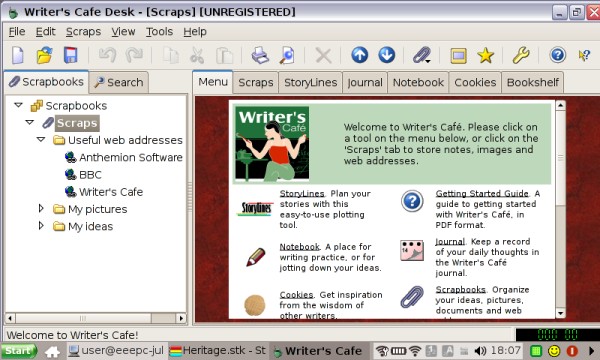
There has been a lot of fuss about the Asus Eee PC in the last few months and Asus have clearly pressed the right consumer buttons with their cheap Linux subnotebook. No doubt there will be many more machines in this format in the future, representing a market of many millions, so it’s an attractive target for developers. Fortunately for wxWidgets programmers, it’s pretty straightforward to adapt wxGTK applications to the requirements of the Eee PC. This consists mainly of two tasks: fitting windows and dialogs onto the 800x480 screen, and distributing the application in a Xandros-friendly package (a .deb).

What if you have a lot of dialogs, and don't want to spend time customizing them? No problem - just replace wxDialog with wxScrollingDialog, a class that rejigs an existing hierarchy to keep the standard buttons shown. You can download the class here.
Should I port my application?
First, a few observations about the Eee PC from the perspective of a developer wondering whether his or her application would be a good match for it. What kind of users are we talking about? Well, it’s such a general-purpose machine it’s hard to narrow it down, but it obviously has appeal to children and women who generally have smallish hands and could more easily adapt to the diminutive keyboard. But at least for casual use, most people could get used to the form factor, and some tasks don’t need much keyboard use, such as browsing, listening to music or reading e-books.
There are plenty of reports of people using the Eee PC for substantial work – it’s good for journalists, photographers, students, and business travellers (although the limited battery life could be a problem on long trips). It could be useful for accountants visiting client premises, for example, or engineers often on the road. The Eee PC enthusiasts’ forums are full of examples of both business and home use. Unlike smaller devices such as the Nokia N series of internet tablets, or Windows Mobile devices, the usable keyboard means that this machine has the potential for running a fuller range of applications, albeit for shorter periods of time than on a larger computer (due to comfort and battery limitations). The high level of compatibility of files and applications between conventional PCs and the Eee PC increases the appeal of performing regular PC work on a highly mobile machine.
Apart from the small keyboard, the main limiting factor is probably not so much the slower processor as the low-resolution screen. However, people are getting used to it and one user has reported that they find a regular screen too big now, and they have to emulate the Eee PC resolution on their desktop!
So, the answer to the question, “Is it worth porting my app to the Eee PC?” is probably going to be “Yes” in most cases. If you’re already writing wxGTK applications, it’s almost a no-brainer. Apart from anything else, there’s a “cool factor” in showing your applications running on the gadget.
Starting wxGTK development
If you are targetting the Eee PC running Linux, then you will use the wxGTK port (wxWidgets on top of GTK+ 2). As a bonus, your work in tailoring applications to the Eee PC display size will also pay off when recompiling your applications for Windows, to target Eee PC running the Microsoft operating system.
There are many combinations of working methods and tools for writing wxGTK applications. I do most of my development on a Windows PC, and compile the apps on Debian Edge running on the same machine (using VMware) for deployment on Linux. The resulting wxGTK application runs on most modern Linux distributions, which all tend to come with the necessary GTK+ 2 libraries regardless of desktop environment in use. The Eee PC’s Xandros is no exception. The .deb archive I distribute for use on standard GNOME and KDE Linux desktops is the same used for the Eee PC, and the applications dynamically adapt to the display in use. Obviously if you’re going to deliver on an Eee PC it helps to have one for testing purposes – although you can do a certain amount of testing by reducing the resolution, you still need to check the installation and performance on real hardware. Having said that, debugging wxGTK-specific issues can mostly be done within the comfort of a spacious Linux desktop using a distro such as Debian, Ubuntu or Xandros.
As for all wxGTK development, you need the GCC compiler (available preinstalled on most Linux distributions), and the GTK+ 2 development libraries (search for the gtk2.0-dev package). For decent printing support, don't forget to install the libgnomeprintui2.2-dev package also before configuring and compiling wxWidgets. Get the latest version of wxWidgets in the 2.8 series, for example wxGTK-2.8.7.tar.gz at the time of writing. You can use plain old Emacs and gdb to write and debug apps, but you may wish to consider IDEs such as Anjuta and Code::Blocks, and for generating code, dialog editors/RAD tools such as DialogBlocks and wxDesigner. Basically, anything that applies to wxGTK development also applies to Eee PC/Xandros development.
If you decide to use DialogBlocks, both to generate first-cut application skeletons and to help generate detailed dialogs, DialogBlocks will help you compile wxWidgets as well as your own app. Create a project (or try one of the samples), select the configuration you want to use, set the wxWidgets path, and DialogBlocks will first compile wxWidgets before compiling the project.
Adapting to the low resolution screen
The following is applicable to any device with a low resolution, so it’ll help you prepare for future Linux-based mobile devices too. It’s also applicable to other operating systems that wxWidgets supports, such as Windows and Mac OS X.
Your first step might be to add a full-screen mode. This is straightforward in wxWidgets, using the wxTopLevelWindow::ShowFullScreen function. The usual shortcut key for this is F11. From wxWidgets 2.8.7, menu accelerators on wxGTK are still active even if the menubar has been removed, so the user can press F11 to restore the window to normal viewing. ShowFullScreen can retain your toolbar, or hide it, depending on your application’s requiremements. If your main window still uses a lot of space for non-essential control windows (for example tabs and extra toolbars), then you might consider reparenting the editing window to a new frame and showing that full-screen, subsequently reparenting the window back when the user returns the window to normal.
Note that currently on wxGTK, the toolbar is restored when returning to normal view, even if the toolbar was previously hidden. You may need to add some extra logic to hide the toolbar explicitly.
Also note another quirk if you’re planning to show a frame full-screen when the program starts – the window may show in its initial size momentarily, then resize to fit the screen. You can mitigate this effect by making the initial window size very small, say wxSize(1, 1).
You may find you made assumptions about screen size when designing elements of your main screen. Palettes, tabs and toolbars can look rather huge and leave little space for editing, especially when even a maximised main window has to compete with a largish title bar at its top, and a taskbar at the bottom of the Eee PC desktop. Here are some ideas for further adaptations:
- Add an option for small toolbar icons if your toolbar currently has large ones. Also make it possible to switch toolbar labels off, and remove inessential tools for low-resolution displays.
- Add an option to hide the toolbar and status bar.
- Use wxAuiNotebook for a tabbed interface, and set the notebook font to a couple of sizes smaller than normal. Native GTK+ tabs can be rather large.
- Use wxWindow::SetWindowVariant to set a smaller font size for panels.
- Use a wxChoicebook instead of wxNotebook for a tabbed palette, to reduce the vertical size requirement.
- Maximise the main window by default on a small screen.
- Make sure there are accelerators for important operations, so that the program is still usable when full-screen and without a toolbar or menubar.
- Consider a vertical toolbar or other control window to the left or right of your main editing area, since vertical space is in shortest supply.
- Use a wxScrolledWindow for larger panels containing controls. You can just replace the wxPanel base class with wxScrolledWindow, and call SetScrollRate to enable the scrollbars.
I have a function I use to test for a small screen – HasSmallScreen – which I use to make UI choices as the windows are created. You can have a balance of customisable and non-customisable choices: you might want everything to be under user control, or you might not want to burden the user with so many choices. But the defaults should reflect the best choices for the display resolution.
Making your dialogs fit
Probably the area you’ll find in need of most work is your application’s dialogs. You may find that some or all of them they disappear off the edge of the screen, especially vertically. There are several techniques you can apply here. Firstly, you can set the initial size of individual controls (such as listboxes) to be smaller when a small display is detected. You can also use wxWindow::SetWindowVariant, and simply omit certain controls and explanations from the dialog. You can do this by creating all elements as usual, but hiding some of them before showing the dialog, for example:
GetSizer()->Show(m_description, false);
In DialogBlocks, you can make sure the control and its sizer parent both have member names, and then before the end of CreateControls() write something like:
m_innerSizer->Show(m_furtherInfo, false);
You may find that after these adjustments, and others including dividing up the dialog into pages, your dialogs will fit. If not, you can take more drastic action using scrolled windows.
To make an ordinary custom dialog scrollable, add a wxScrolledWindow under the top sizer, add a sizer to the scrolled window, and place the main controls under that sizer. Keep the OK and Cancel button row under the dialog’s main sizer so only the main content of the dialog scrolls, leaving the OK and Cancel buttons accessible at all times. Initially, don’t make the scrolled window scrollable. If you are using DialogBlocks, set PPU X and PPU Y to zero and ensure “Fit to content” is checked and also that the wxNO_BORDER and wxTAB_TRAVERSAL styles are checked. When you have done this, the dialog should behave exactly as before, when wxSizer::SetSizeHints is called and the dialog shown.
Now you need to check whether the dialog size is the same or more than the available desktop client size. wxSizer::Fit (called by wxSizer::SetSizeHints) attempts to restrict the dialog to the available space, so you need to assume that if one or both dimensions are the same as the desktop dimensions, the dialog was too big and has been resized. If the whole dialog couldn’t fit, you need to enable the scrolled window’s scrollbars and resize the dialog, taking into account the dialog titlebar which wxWidgets 2.8 doesn’t currently do itself.
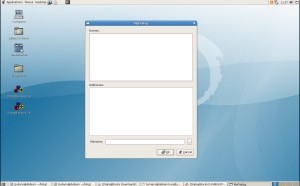
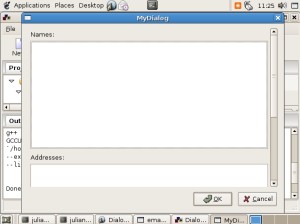
A simple example built with DialogBlocks is available as a zip file and as a tar.gz file from http://www.anthemion.co.uk/wx/largedialog.tar.gz or http://www.anthemion.co.uk/wx/largedialog.zip. You can use the demo version of DialogBlocks to build and run the sample, or you can adapt the makefile as you see fit, or you can simply copy and paste the relevant code for your own applications. The images below show the dialog first on a regular-sized Debian desktop (no scrollbar), and secondly on a 640x480 display (a vertical scrollbar appears).
What if you have a lot of dialogs, and don't want to spend time customizing them? No problem - just replace wxDialog with wxScrollingDialog, a class that rejigs an existing hierarchy to keep the standard buttons shown. You can download the class here.
Distributing your application
While it’s best to create a .deb archive, you could also distribute a tarball. For a shortcut to making Debian archives, see checkinstall. For creating a .deb from scratch, see for example here and here.
The .deb or your installation script should also install desktop files and MIME type files. These are standards documented by Freedesktop.org in particular the .desktop file standard. When you install your .desktop files and icons into the appropriate place, and specify the application category, the KDE or GNOME desktop environment will know where to put your application’s shortcut(s) on its menus. However, most people may be using the standard IceWM window manager – the old version in use on Xandros doesn’t follow Freedesktop.org standards and you will need to add the ability to enable the Start menu and add your application’s menu items. I do this with a script that’s included in my application files, so the user can run the script to complete the installation. It’s separate, in case the user isn’t running IceWM. The script creates local IceWM preferences and enables the Start menu; then it appends an entry to the menu file if it’s not already there. The user should reboot X with Ctrl+Alt+Backspace for the changes to take effect.
An example script is available here.
That’s all for now. Good luck with your Eee PC projects! I think the Eee PC and wxWidgets make a great combination, and it will be interesting to see how the market for desktop Linux will develop over the coming months.
Sunday, November 25, 2007
Hildonizing wxGTK
Last week-end I have somehow managed to find myself with a couple of hours of free time and, instead of spending them on fixing random wxWidgets bugs as usual, I wanted to actually do something new and different for once and so chose to check how wx applications look on a Nokia 770 tablet. Several people have talked about porting wxWidgets to this device in the past and at least one has apparently done some work but it was almost two years ago and nothing has happened since, so I felt it was time to do something about it myself; especially as I own a N770 tablet since quite some time but, instead of writing programs for it as originally planned, I've so far spent time just using it (I do feel ashamed).
For those who don't know about Nokia internet tablets line, which started with N770 but has been extended with N800 and N810 since then, they're small handheld non phone devices which run Linux and use a modified Gnome desktop version called Maemo. Maemo basically just adds another level of libraries, called Hildon on top of GTK+ itself. So, while GTK+ applications can mostly run on N770 without changing, they don't have the correct look and feel before they are hildonized, that is modified to use Hildon-specific functions instead of the generic GTK+ ones -- hence the somewhat barbaric adjective used in the title of this article.
This is the theory, anyhow. And I've decided to check how it was in practice. The first results were encouraging: after a few simple fixes, wxGTK did build for Maemo and I could run applications on my device. However they really didn't look like they belonged here as can be seen by comparing the dialogs sample:
Have fun!
For those who don't know about Nokia internet tablets line, which started with N770 but has been extended with N800 and N810 since then, they're small handheld non phone devices which run Linux and use a modified Gnome desktop version called Maemo. Maemo basically just adds another level of libraries, called Hildon on top of GTK+ itself. So, while GTK+ applications can mostly run on N770 without changing, they don't have the correct look and feel before they are hildonized, that is modified to use Hildon-specific functions instead of the generic GTK+ ones -- hence the somewhat barbaric adjective used in the title of this article.
This is the theory, anyhow. And I've decided to check how it was in practice. The first results were encouraging: after a few simple fixes, wxGTK did build for Maemo and I could run applications on my device. However they really didn't look like they belonged here as can be seen by comparing the dialogs sample:

with a native application, such as this one:

You can immediately see several differences:
- The border of the window are not the same, the wx example doesn't fit into the desktop
- The menus are completely different: the native applications don't show a menu bar but use the drop down menus attached to the window itself
- The wx example shows a useless status bar with an even more useless resize grip (the window can't be resized anyhow)

This is already much better: the points mentioned above were corrected and I also added a new class (which is available, and hopefully will be useful, under the other platforms too) called wxNotificationMessage and which is used by the small message in the upper right part of the window (such messages are often used in Maemo UI as notifications and also message box replacements)
Of course, there are a lot of other things to do. For one, wxToolBar needs to be changed in the same way wxMenuBar was. Next, as Maemo replaces almost all of the standard GTK+ dialogs with its own ones, we need to do it too. I did it for the colour selection dialog which looks like this now if wxWidgets was built with --with-hildon option:
 And the same should be done for the file selection dialogs and several other ones.
There are also less trivial things to do, like to understand how can the size of the library (and of the applications using it) be reduced to be more in line with the embedded systems capabilities. But globally I think wxWidgets is perfectly viable for developing Maemo applications and is even more convenient for doing this than raw GTK+ (which is the native toolkit of the platform) because it transparently abstracts the differences between the desktop GTK+ and Maemo systems: the dialogs sample itself hasn't been modified at all (just extended to show the notification message) to use the correct menus and so on, everything is done inside the library so exactly the same code can be used for the desktop application without any loss in functionality. Of course, in practice you will need to adapt applications to the mobile devices by probably removing some functionality which doesn't make sense there and simplifying the user interface. But wxWidgets already does some of this for you and hopefully will do even more in the future.
Have fun!
Sunday, November 04, 2007
Looking forward to wxWidgets 3
The first alpha version of wxWidgets 2.0 was released 10 and a half years ago and we are still (only) at version 2.8.6 right now so the wxWidgets version numbers don't change very quickly as we, with the disdain proper to free software developers, don't really like inflating them for marketing purposes. However soon -- hopefully in the beginning of the next year -- we will release wxWidgets 3.0 which will be the first change of major version since a long time and only the second time it happens in wxWidgets history. So it may be interesting to look at what exactly has changed to warrant this and I'll try to briefly describe it in this post.
First, a word of reassurance: there are no sweeping backwards-incompatible changes in wxWidgets 3.0 compared to 2.8. We did have to break compatibility in a few places but fixing the existing code to compile with 3.0 will be trivial, if needed at all, unlike 1.0 -> 2.0 transition which required rewriting it.
Second, the main change in 3.0 is the rethought support of Unicode. While wxWidgets supports Unicode since quite a long time, so far it did according to Win32 model: there were two different builds of the library, one ANSI and the other Unicode and you could either use the former to use the familiar char * strings but stay limited to a single encoding or choose the latter one and be able to use Unicode in the GUI but at the price of working with wchar_t * string only which implied using ugly-looking wxT() macro in a lot of places for example. wxWidgets 3.0 will have only one build (which on its own is a great simplification for developers, packagers and even users who won't hesitate between which one to choose) combining the best features of the two: it will always use Unicode internally but support char * string and simply convert them using the current encoding transparently. In other words, you will be able to write code in exactly the same way as with the old ANSI build if this is all you need but profit from the full Unicode support at the same time. This is especially nice for the existing wxWidgets applications which weren't always written with Unicode in mind and so often didn't even compile with the Unicode build of wx -- now they will and it will be possible to extend them to deal with Unicode at leisure instead of spending a big initial effort on wxT()-izing them first.
wxWidgets 3.0 is still work in progress, in particular documentation hasn't been updated to reflect the changes yet. However the API and the code are believed to be stable enough to be used and we'd welcome any feedback on the new API. In particular, please try recompiling the existing code with the version currently in the svn trunk and let us know about any problems you may encounter (other than those which are mentioned in docs/changes.txt: please read it first!).
There are, of course, many other new features in wxWidgets 3.0 (without speaking about the bug fixes...):
First, a word of reassurance: there are no sweeping backwards-incompatible changes in wxWidgets 3.0 compared to 2.8. We did have to break compatibility in a few places but fixing the existing code to compile with 3.0 will be trivial, if needed at all, unlike 1.0 -> 2.0 transition which required rewriting it.
Second, the main change in 3.0 is the rethought support of Unicode. While wxWidgets supports Unicode since quite a long time, so far it did according to Win32 model: there were two different builds of the library, one ANSI and the other Unicode and you could either use the former to use the familiar char * strings but stay limited to a single encoding or choose the latter one and be able to use Unicode in the GUI but at the price of working with wchar_t * string only which implied using ugly-looking wxT() macro in a lot of places for example. wxWidgets 3.0 will have only one build (which on its own is a great simplification for developers, packagers and even users who won't hesitate between which one to choose) combining the best features of the two: it will always use Unicode internally but support char * string and simply convert them using the current encoding transparently. In other words, you will be able to write code in exactly the same way as with the old ANSI build if this is all you need but profit from the full Unicode support at the same time. This is especially nice for the existing wxWidgets applications which weren't always written with Unicode in mind and so often didn't even compile with the Unicode build of wx -- now they will and it will be possible to extend them to deal with Unicode at leisure instead of spending a big initial effort on wxT()-izing them first.
wxWidgets 3.0 is still work in progress, in particular documentation hasn't been updated to reflect the changes yet. However the API and the code are believed to be stable enough to be used and we'd welcome any feedback on the new API. In particular, please try recompiling the existing code with the version currently in the svn trunk and let us know about any problems you may encounter (other than those which are mentioned in docs/changes.txt: please read it first!).
There are, of course, many other new features in wxWidgets 3.0 (without speaking about the bug fixes...):
- The new wxDataViewCtrl class provides all the features lacking in wxListCtrl and a much better and simpler API to use them.
- There is a new wxDFB (DirectFB-based) port especially suitable for the embedded devices.
- wxGTK (and wxDFB) are also more efficient internally because they use UTF-8 for the string representation, instead of wchar_t and so avoid the conversions between the underlying toolkit strings and wxString.
- New and improved wxFileCtrl (thanks to Google summer of code).
- Many enhancements to wxRichTextCtrl.
- Important improvements to several controls under wxGTK, including wxToolBar, wxStaticText, wxHyperlinkCtrl and others.
- Support for auto-completion in wxTextCtrl and wxComboBox.
Sunday, April 15, 2007
wxWidgets in Leopard
The new schedule of Apple's OS X 10.5 a.k.a. Leopard (to ship in October) allows us to get a newer version of 2.8 into the builds. So we aim for a 2.8.4 Release Candidate around the end of April, synching wxPython and wxPerl with it.
Monday, February 05, 2007
wxWidgets under Vista
I've decided to (finally) test how do wxWidgets applications fare under Windows Vista. Installing Vista (in a VMware Workstation 6 Beta virtual machine under a Debian amd64 host) turned out to be more problematic than I thought as the MSDN disk 2429.5 contains exactly 4 ISO images of Vista CDs while the installer asked me to insert disk 5 and as I didn't have I couldn't continue with the installation. So I had to install the Enterprise Edition from the disk 2430.2 which not only comes with 4 CD images on the DVD but also actually installs from them.
Other than that, installation was pretty uneventful and un-wow: the installer warns that the computer must reboot several times during the installation -- and so it does. Why no other system among those I installed (various Linux distributions, FreeBSD, Mac OS X, ...) needs to reboot even once? Anyhow, UI-wise the only useful information from the installer is that Vista seems to use ./../... animation as an indeterminate progress control (OS X, or Firefox which probably copied it from it, use a small spinning wheel for the same thing) so if we ever implement a separate control for this, we know how it should look under Windows now.
After finishing the installation and getting rid of half a dozen of the icons in the taskbar notification area (this is progress, I think XP had only a couple of them) I could finally run the widgets sample. The only problem I could see with it was with wxNotebook tabs on the left or right: this doesn't work at all under Vista and I think we should just abandon trying to make it work as it already was pretty buggy under XP.
But there are a few enhancements we could implement, of course:
All in all I think wxWidgets applications look pretty decently under Vista, especially considering that we didn't spend any effort at all so far on porting the code to Vista. Of course, it's a tribute to Microsoft engineers backwards compatibility maintaining skills more than anything we did but it's still nice, especially compared with the transition to XP when previously working code started to crash and a lot of things didn't look right at all.
Other than that, installation was pretty uneventful and un-wow: the installer warns that the computer must reboot several times during the installation -- and so it does. Why no other system among those I installed (various Linux distributions, FreeBSD, Mac OS X, ...) needs to reboot even once? Anyhow, UI-wise the only useful information from the installer is that Vista seems to use ./../... animation as an indeterminate progress control (OS X, or Firefox which probably copied it from it, use a small spinning wheel for the same thing) so if we ever implement a separate control for this, we know how it should look under Windows now.
After finishing the installation and getting rid of half a dozen of the icons in the taskbar notification area (this is progress, I think XP had only a couple of them) I could finally run the widgets sample. The only problem I could see with it was with wxNotebook tabs on the left or right: this doesn't work at all under Vista and I think we should just abandon trying to make it work as it already was pretty buggy under XP.
But there are a few enhancements we could implement, of course:
- wxSearchCtrl doesn't look native but Vista does has a native version (just as OS X) and uses it everywhere so it's really jarring to have a different one in wx programs. Apparently the standard "Search Control" class is just a combination of "Edit" and "ToolbarWindow32" (with "Static" thrown in to show the inactive control contents) so we could emulate it easily even on pre-Vista systems. Or we could just use the native control, of course.
- Buttons with images seem finally to be supported (they can be seen in e.g. "Tools" page of a disk properties dialog), so we should update wxButton to support this too.
- As mentioned before, some file dialogs (e.g. Ctrl-O one in the dialogs sample) use old style while other ones (Ctrl-Q one) use a new style one which is inconsistent at best. Other dialogs seem to be just fine though, and the new Vista-style icons are used everywhere as expected, e.g. in the log dialog. Funny enough, the standard Vista error message dialog now looks a lot like wxWidgets standard log dialog with its "Details >>" button.
All in all I think wxWidgets applications look pretty decently under Vista, especially considering that we didn't spend any effort at all so far on porting the code to Vista. Of course, it's a tribute to Microsoft engineers backwards compatibility maintaining skills more than anything we did but it's still nice, especially compared with the transition to XP when previously working code started to crash and a lot of things didn't look right at all.
Friday, January 26, 2007
In Praise of Connect()
In this post I'd like to address a common misconception about wxWidgets which is that it is somehow dirty and beneath consideration of "real" C++ programmers because it relies too much on preprocessor macros. While it is true that the traditional way to handle events in wxWidgets is using the macro-based event tables, there is nothing really dirty nor evil about these macros: they are there simply to save typing. In particular, they don't suffer from the usual macro pitfalls as they don't have any side effects and are type-safe (static_cast is used internally to ensure this).
However the main point is that the event tables macros are just one of two ways of connecting the event handlers to events in wxWidgets and it's perfectly possible to not use them at all. Moreover, there are good reasons to use the alternative way beyond the subjective dislike of macros. This other way is the Connect() method which, unsurprisingly, allows to connect a method of a class derived from wxEvtHandler (which includes, but is not limited to, any wxWindow-derived class) to an event.
The syntax is slightly more verbose which is, of course, one of the reasons for using the event table macros in the first place, they simply save some typing. So instead of
you need to write (in the body of some method of MyFrame and not at global scope as with the event tables)
Notice the use of wxCommandEventHandler which ensures that the method is of correct type by using static_cast in the same way as event table macros do it.
So we see that all uses of event table macros can be trivially replaced with Connect() calls. However Connect() is more powerful than macros and can do a few things that macros are incapable of:
So the morale of the story is: don't hesitate to use Connect(), it's much more powerful than static event tables which should be reserved just for the most simple situations when you don't need any additional flexibility and wish to save some extra typing, or maybe not even then for consistency sake.
However the main point is that the event tables macros are just one of two ways of connecting the event handlers to events in wxWidgets and it's perfectly possible to not use them at all. Moreover, there are good reasons to use the alternative way beyond the subjective dislike of macros. This other way is the Connect() method which, unsurprisingly, allows to connect a method of a class derived from wxEvtHandler (which includes, but is not limited to, any wxWindow-derived class) to an event.
The syntax is slightly more verbose which is, of course, one of the reasons for using the event table macros in the first place, they simply save some typing. So instead of
BEGIN_EVENT_TABLE(MyFrame, wxFrame)
EVT_MENU(wxID_EXIT, MyFrame::OnQuit)
END_EVENT_TABLE()
you need to write (in the body of some method of MyFrame and not at global scope as with the event tables)
MyFrame::MyFrame(...)
{
Connect(wxID_EXIT, wxEVT_COMMAND_MENU_SELECTED,
wxCommandEventHandler(MyFrame::OnQuit));
}
Notice the use of wxCommandEventHandler which ensures that the method is of correct type by using static_cast in the same way as event table macros do it.
So we see that all uses of event table macros can be trivially replaced with Connect() calls. However Connect() is more powerful than macros and can do a few things that macros are incapable of:
- Event handlers can be connected at any moment, e.g. it's possible to do some initialization first and only connect the handlers if and when it succeeds. This can avoid the need to test that the object was properly initialized in the event handlers themselves: with Connect() they simply won't be called at all if it wasn't.
- As a slight extension of the above, the handlers can also be
Disconnect()ed at any time. And maybe later reconnected again. Of course, it's also possible to emulate this behaviour with the classic static (i.e. connected via event tables) handlers by using an internal flag indicating whether the handler is currently enabled and returning from it if it isn't, but using dynamically connected handlers requires less code and is also usually more clear. - Also notice that you must derive a class inherited from, say, wxTextCtrl even if you don't want to modify the control behaviour at all but just want to handle some of its events. This is especially inconvenient when the control is loaded from the XRC. Connecting the event handler dynamically bypasses the need for this unwanted subclassing.
- Last but very, very far from least is the possibility to connect an event of some object to a method of another object. This is impossible to do with event tables because there is no possibility to specify the object to dispatch the event to so it necessarily needs to be sent to the same object which generated the event. Not so with Connect() which has an optional eventSink parameter which can be used to specify the object which will handle the event. Of course, in this case the method being connected must belong to the class which is the type of the eventSink object! To give a quick example, people often want to catch mouse movement events happening when the mouse is in one of the frame children in the frame itself. Doing it in a naive way doesn't work:
- A EVT_LEAVE_WINDOW(MyFrame::OnMouseLeave) line in the frame event table has no effect as mouse move (including entering and leaving) events are not propagated upwards to the parent window (by default, anyhow).
- Putting the same line in a child event table will crash during run-time because the MyFrame method will be called on a wrong object.
However writing
MyFrame::MyFrame(...)
{
m_child->Connect(wxID_ANY,
wxEVT_LEAVE_WINDOW,
wxMouseEventHandler(MyFrame::OnMouseLeave),
NULL, this);
}
will work exactly as expected. Note that you can get the object which generated the event -- and which is not the same as the frame -- via event.GetEventObject(). - A EVT_LEAVE_WINDOW(MyFrame::OnMouseLeave) line in the frame event table has no effect as mouse move (including entering and leaving) events are not propagated upwards to the parent window (by default, anyhow).
So the morale of the story is: don't hesitate to use Connect(), it's much more powerful than static event tables which should be reserved just for the most simple situations when you don't need any additional flexibility and wish to save some extra typing, or maybe not even then for consistency sake.
Friday, December 22, 2006
Goals of wxWidgets
A comment attached to the last post asked the question about what wxWidgets goals are. I was initially quite surprized because the answer was so obvious to me, but thinking a bit more about this I realized that we don't clearly answer this question anywhere in the public documentation and so for someone not following wx-dev mailing list the direction of wxWidgets development may indeed seem mysterious. To help with understanding it, I'd like to briefly explain where wxWidgets is coming from, what are the guiding principles for its development today and what I hope it is going to be tomorrow. Please note that, as anyone who does follow wx-dev would know, we don't always agree about everything and so what follows is just my personal point of view and while it hopefully does overlap with that of the others -- at least for the past and present parts -- I don't pretend to speak for everybody.
This disclaimer aside, let's start by looking at the current state of wxWidgets and how did we get there. On the negative, and often mentioned, side, it's an accretion of almost 15 years of development, by different people, some of which have stopped contributing to the project since a long time. So it is not surprising that there are some inconsistencies in the API (although we work hard on ironing them out) and some components (notably those whose maintainers have left) are not as good as one'd expect them to be. It is also true that compatibility with MFC seemed much more important in the nineties than now and this explains why wxWidgets has some superficial similarities to it, although it has never been nor designed to be, an MFC clone. So it's true that this long history resulted in some problems and we had to change quite a few things to fix them -- even the original name of the library turned out to be a bad idea.
However, on the bright side, not everything we did during these 15 years was a complete waste of time and, in addition to the accumulated historical luggage, everything that we did right is in the wxWidgets codebase too. And this is quite enough to allow people to create real life, professional complicated graphical cross-platform applications -- which is, to answer the initial question, what wxWidgets is about. To be more precise, the main goal is to allow the developers to do everything they need to do without resorting to writing platform-specific code: the "Write once, compile anywhere" principle. Of course, this goal is a moving target which can never be quite achieved because developers discover more and more things that they need to do with time as the new graphical environments introduce new standards (use of gradients and animations in the GUI was not exactly common when wxWidgets was started) but, still, I believe we're pretty close to it -- and getting closer with every new release.
So wxWidgets primary goal is to allow creating sophisticated portable applications without writing platform-specific code. This is not the only goal, of course, but it's the most important one and so trumps all the others. For example, wxWidgets could be more size efficient but this would be mostly important for toy applications and not for the programs which are themselves of reasonably important size. And so, while we'd be as glad to make wxWidgets smaller as anybody else, this currently has a relatively low priority because it's not very important from the main goal perspective. On a perhaps more constructive note, this also explains why do we consider the differences in behaviour of wxWidgets on different platforms important bugs: it's useless to have the code which compiles on all platforms if it doesn't behave the same everywhere during run-time.
But, to repeat, as important as this goal is, I think we're quite close to it and have been there since a long time. However other things could really be improved. Chief among them is the ease of use of wxWidgets: things have changed a lot since its creation and, in particular, modern C++ doesn't have much to do with C++ of the nineties. So it would be great to make wxWidgets evolve with the language and other standard C++ libraries. This would mean providing a more modern API, removing the need for memory management completely (this is very rarely a problem in wxWidgets even now, as most of the objects are owned by the library anyhow, but it would be nice to make this more explicit) and improve error handling by using exceptions. We should also rely more on the standard C++ library and Boost instead of implementing all various useful but not directly GUI-related classes on our own as we had to do in the past (as not implementing them would have conflicted with our primary goal whereas now, when such classes are available from elsewhere, it doesn't any more). This, and much more, is in our plans for wxWidgets 3.
There are certainly a lot of other tactical goals. The fact that I didn't mention at all fixing the bugs or improving the documentation doesn't mean that these goals are not important but just that they are obvious and I don't want to make this article even longer than it already is by stating the obvious. The point of this post was to just say that strategically, our main goal always was and remains making wxWidgets suitable for real-life portable applications development and, in addition, creating a new, modern, API for wxWidgets 3 in (hopefully near) future.
This disclaimer aside, let's start by looking at the current state of wxWidgets and how did we get there. On the negative, and often mentioned, side, it's an accretion of almost 15 years of development, by different people, some of which have stopped contributing to the project since a long time. So it is not surprising that there are some inconsistencies in the API (although we work hard on ironing them out) and some components (notably those whose maintainers have left) are not as good as one'd expect them to be. It is also true that compatibility with MFC seemed much more important in the nineties than now and this explains why wxWidgets has some superficial similarities to it, although it has never been nor designed to be, an MFC clone. So it's true that this long history resulted in some problems and we had to change quite a few things to fix them -- even the original name of the library turned out to be a bad idea.
However, on the bright side, not everything we did during these 15 years was a complete waste of time and, in addition to the accumulated historical luggage, everything that we did right is in the wxWidgets codebase too. And this is quite enough to allow people to create real life, professional complicated graphical cross-platform applications -- which is, to answer the initial question, what wxWidgets is about. To be more precise, the main goal is to allow the developers to do everything they need to do without resorting to writing platform-specific code: the "Write once, compile anywhere" principle. Of course, this goal is a moving target which can never be quite achieved because developers discover more and more things that they need to do with time as the new graphical environments introduce new standards (use of gradients and animations in the GUI was not exactly common when wxWidgets was started) but, still, I believe we're pretty close to it -- and getting closer with every new release.
So wxWidgets primary goal is to allow creating sophisticated portable applications without writing platform-specific code. This is not the only goal, of course, but it's the most important one and so trumps all the others. For example, wxWidgets could be more size efficient but this would be mostly important for toy applications and not for the programs which are themselves of reasonably important size. And so, while we'd be as glad to make wxWidgets smaller as anybody else, this currently has a relatively low priority because it's not very important from the main goal perspective. On a perhaps more constructive note, this also explains why do we consider the differences in behaviour of wxWidgets on different platforms important bugs: it's useless to have the code which compiles on all platforms if it doesn't behave the same everywhere during run-time.
But, to repeat, as important as this goal is, I think we're quite close to it and have been there since a long time. However other things could really be improved. Chief among them is the ease of use of wxWidgets: things have changed a lot since its creation and, in particular, modern C++ doesn't have much to do with C++ of the nineties. So it would be great to make wxWidgets evolve with the language and other standard C++ libraries. This would mean providing a more modern API, removing the need for memory management completely (this is very rarely a problem in wxWidgets even now, as most of the objects are owned by the library anyhow, but it would be nice to make this more explicit) and improve error handling by using exceptions. We should also rely more on the standard C++ library and Boost instead of implementing all various useful but not directly GUI-related classes on our own as we had to do in the past (as not implementing them would have conflicted with our primary goal whereas now, when such classes are available from elsewhere, it doesn't any more). This, and much more, is in our plans for wxWidgets 3.
There are certainly a lot of other tactical goals. The fact that I didn't mention at all fixing the bugs or improving the documentation doesn't mean that these goals are not important but just that they are obvious and I don't want to make this article even longer than it already is by stating the obvious. The point of this post was to just say that strategically, our main goal always was and remains making wxWidgets suitable for real-life portable applications development and, in addition, creating a new, modern, API for wxWidgets 3 in (hopefully near) future.
Sunday, December 03, 2006
How to Contribute to wxWidgets Guide
We often have the impression that wxWidgets could be so much better if only we had more time to fix the known problems with it, to implement all these exciting new features it still lacks or even just to fix the numerous old bugs. But unfortunately the time is always lacking (isn't it funny that you can regularly find jokes about 48 hour days in wx-related email since the beginning of the nineties?) and so many things remain undone. So the next idea, after failing to change the duration of the day, is to encourage more people to work on wxWidgets -- and it seems especially actual now that programming is becoming all about parallelization to take advantage of new multi-processor machines. And attracting new contributors does work rather nicely (better than trying to construct time dilatation machine, anyhow), for instance several new developers joined us relatively recently and brought us great things like AUI, custom comboboxes and almost all other new controls in the upcoming 2.8.0 release.
But we'd still like to attract even more! And maybe it's our own fault, after all, if people don't flock to wxWidgets development. We don't do much advertisement (real programmers hate marketing) and we don't even explain clearly how to become a wxWidgets contributor anywhere. Personally, as I want to keep my real programmer badge, I can't really address the former issue but at least I tried to help with the latter and so wrote this guide to explain how you can help with wxWidgets development. It is probably not as useful as it could be as it's hard for me to understand what questions and problems can a newcomer to wxWidgets (and/or open source development in general) have. But hopefully this guide is better than nothing at all and I'm looking forward to improving it in the future with feedback from the people it is really addressed to.
So thanks in advance for any comments about this guide! As for me, I'm finally going to log off and have a few hours of sleep after my 40 hours wxWidgets working day, safe in the knowledge that hundreds of new developers are going to join the project tomorrow ;-)
But we'd still like to attract even more! And maybe it's our own fault, after all, if people don't flock to wxWidgets development. We don't do much advertisement (real programmers hate marketing) and we don't even explain clearly how to become a wxWidgets contributor anywhere. Personally, as I want to keep my real programmer badge, I can't really address the former issue but at least I tried to help with the latter and so wrote this guide to explain how you can help with wxWidgets development. It is probably not as useful as it could be as it's hard for me to understand what questions and problems can a newcomer to wxWidgets (and/or open source development in general) have. But hopefully this guide is better than nothing at all and I'm looking forward to improving it in the future with feedback from the people it is really addressed to.
So thanks in advance for any comments about this guide! As for me, I'm finally going to log off and have a few hours of sleep after my 40 hours wxWidgets working day, safe in the knowledge that hundreds of new developers are going to join the project tomorrow ;-)
Friday, October 27, 2006
wxWidgets at Firebird Conference 2006
The fourth worldwide Firebird Conference will convene at Andels Hotel in Prague, Czech Republic, on Sunday November 12. Notice one of the talks: "Developing Cross-Platform Applications with Firebird and wxWidgets" by Milan Babuskov. Be there!
Wednesday, October 18, 2006
wxwidgets.org website issues
As mentioned in a comment on a previous post, the http://www.wxwidgets.org website is currently blank and has been so for a few hours now. Robin Dunn mentioned on the users mailing list that the likely cause is that vhost.sourceforge.net is currently down; alternate addresses such as
http://wxwindows.sourceforge.net/
Still appear to work.
Recently in the past there were also issues with speed of the site as well, possibly concerning sourceforge hosting; specifically image loading. Sometimes images would only load half the time. Images were shifted to and from an alternate server (run by Kevin Olliver) in an attempt to provide a temporary fix for the issue.
Subscribe to:
Posts (Atom)
